Flowcharts · prospect phase · seminar route

The prospect flow

Top to bottom, boxes and arrows. First how it runs today, then the rewired version. Red boxes are where something dies or gets re-typed; amber are the triggers.

Rewired

Same journey, but the two events the firm already produces — the scan and the booking — do the routing. People appear where judgement matters.

⚡ trigger — an event fires 🤖 the system does it 👩‍💼 a person approves 🤝 stays human, deliberately ✅ the gate 🖱️ click any box — 📄 opens the form, ⚡/🤖 opens the background work

  
Six amber triggers carry the whole phase. Every one is an event that already happens today — the scan, the booking, the signature, the transcript. People remain at exactly four points: the review queue, the callback, the room, and the approvals.
🗄️ Today — the as-is flow, kept for reference

Two ways in — the seminar and the phone. Both funnel through hand-typing before anything exists in a system.

a person does it re-typing or a dead end the gate

  
Count the red. Six boxes are re-typing or dead ends — and the two hand-typed funnels (Shannon’s sixty, Tiffany’s sheet) sit directly on the critical path.

The prep, unfolded

The single “prep” box above compresses six of Shannon’s steps, a fork, and the attorney’s own morning routine. Here it is properly — and what each step becomes.


Today: eleven manual steps before a single consultation. Shannon’s six, the Joanna fork, and four for the attorney — of which three exist only to work out things a system should already know (which client, new or existing, what came in ahead).

  
Rewired: the booking spawns five records; two humans remain. Joanna keeps the physical pull — now leaving a custody record — and Shannon moves from doing all six steps to reviewing the exceptions. Note what quietly disappeared: the Grow→Manage conversion has no successor. The Manage matter opens once, at the LSA gate. Its only stated reason to exist early — “so it has a Documents tab” — dissolves when documents live on the platform record. Open question for the firm: does anything else genuinely need Manage before the consultation?

Inside the machines — where the AI actually kicks in

Every 🤖 and ⚡ box above, opened up. Each step names its component and its build status — this is the planning layer. Click a process to expand it.

SHIPPED running in production WIRE-UP exists, needs connecting BUILD new work BLOCKED external dependency DECIDE firm decision first
🧠 AI language model 👁️ DOC-INTEL OCR / form extraction 🎙️ SPEECH transcription ⚙️ PLUMBING events, storage, rules
⚡📠 The scan lands → prospects drafted — the blue-form machine
  1. ⚙️WIRE-UPThe scan ships straight to document intelligence — never through the email classifier. The scanner targets a dedicated ingestion address (or a watched folder); either way the bundle lands directly on the document-intelligence endpoint. Email, where used, is a dumb pipe. Deliberately NOT the mail pipeline: that is built to classify correspondence, and its pre-classifier skip rules must never be able to eat a scan. The QR means the document announces itself — there is nothing to classify.
  2. ⚙️BUILDQR decode per page. Each page's code names the form type + the seminar event. Small, deterministic, no AI.
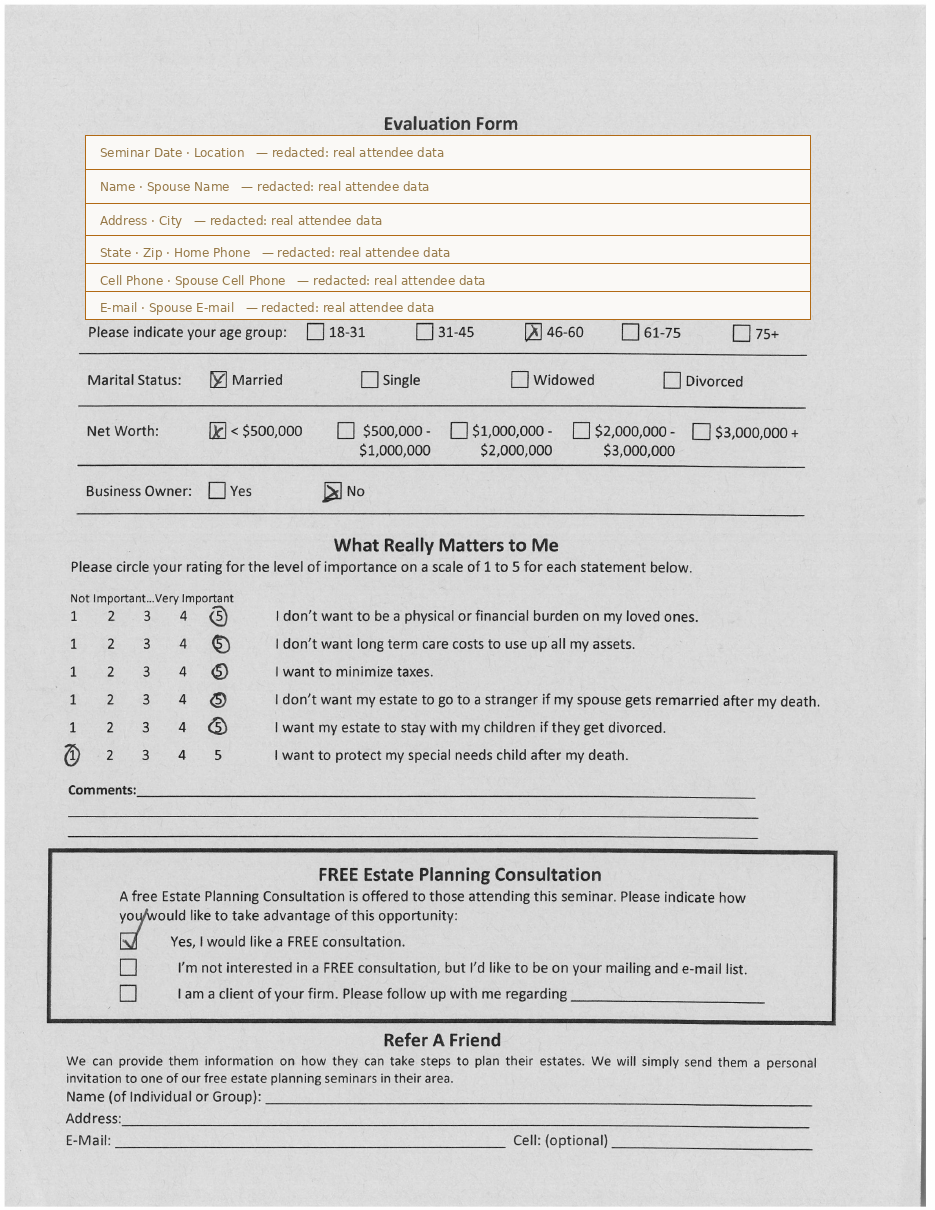
  3. 👁️SHIPPEDHandwriting extraction. The intake-forms engine's OCR + AI pass (built for the PDF↔form work) reads name, phone, email, interests — and the priority marks.
  4. 🧠BUILDConfidence scoring per field. Anything below threshold is flagged — this is what decides which pages Shannon actually sees.
  5. WIRE-UP⚙️Dedup against existing contacts. The synced contact base (28k+) and fuzzy matching already exist — connect them so a returning attendee doesn't become a duplicate.
  6. ⚙️BUILDEvery page becomes a prospect, assigned to Shannon. Station one of the sales pipeline — nothing files itself into the void; every prospect has an owner from record one. Each carries its source page and a status: ✓ all information good, or ⚠ these fields need her. Flagged ones sort first.
  7. ⚙️BUILDHer advance starts the journey. Moving a prospect out of New Prospects is the pipeline event — and it releases the acknowledgement with the booking link. Not auto-send, not a separate approval: advancing IS the release.
  8. DECIDE⚙️The marketing flow. Rebekah's open question from Shannon's interview, never answered: "In addition to saving that to Clio, do we need to do something in the marketing flow with those?" — whether captured attendees enter ActiveCampaign, and how.
  9. ⚙️BUILDThe acknowledgement rides on the advance. Shannon moving a prospect forward releases it — a person's deliberate act on every outbound send, no auto-mail, no extra approval step. (Confirm with Charles that this satisfies his fees-clear-before-the-queue rule.)
📱 iPad form → instant draft — the no-scan road
  1. ⚙️SHIPPEDIntake form submission. The engine and public form links are live — the blue form becomes one more intake-form definition.
  2. ⚙️WIRE-UPDedup + prospect creation. Same components as the scan road, minus OCR entirely. Only a dedup conflict ever needs a human.
⚡📬 Voicemail caught → callback task — the phone machine
  1. 🧠BUILDVoicemail classification. The classifier runs in production but voicemail is a known gap in its categories — it needs the class added and trained. (This one genuinely IS the mail pipeline's job — a voicemail is correspondence. Scanned documents are not; they go straight to document intelligence.)
  2. 🎙️WIRE-UPProper re-transcription. Faster-Whisper large-v3 runs on Beast's GPU today (~13× realtime) — pipe the MP3 through it instead of trusting the carrier's rough transcript.
  3. 🧠BUILDCaller extraction + intent. Name, number, what they want — from the transcript.
  4. ⚙️WIRE-UPMatch or create, then task Brittany. Fuzzy contact matching exists; the callback task carries the recap. The task lives on the platform — Grow's API has no tasks.
  5. ⚙️WIRE-UPBoth voicemail lines. The spreadsheet it retires has two feeds — Brittany's voicemails (Tiffany types them) and the front-desk line Joanna Burns checks (map P6). Both route through this same voicemail-email trigger, or the front-desk line is left on a retired sheet.
⚡📅 The booking → prep spawns itself — Shannon's six steps, as processes
  1. ⚙️BUILDThe booking event itself. Platform booking pages for paralegals (replacing Grow links); a Calendly webhook for the attorneys — Calendly survives for Traci's automations. The Grow-link bookings must move: Grow's API exposes no scheduling or calendar endpoints at all, so a Grow-side booking cannot be listened for — and today both rails are reached via Traci Carver's 340 Network SharePoint page (map P8).
  2. ⚙️SHIPPEDTask instantiation. The workflow/task engine is live — the prep checklist becomes a template it spawns per booking.
  3. ⚙️BLOCKEDClient folder creation on the P drive — blocked on Azure access to the P/O drives (with Curt since 08-12).
  4. ⚙️BUILDConsultation record. One platform record — replaces the Grow consultation matter outright; nothing to convert later.
  5. ⚙️BUILDRecap staged from a template library — Shannon's OneNote templates, migrated once, staged automatically forever.
  6. ⚙️WIRE-UPTeams meeting with transcription on. A Graph calendar event with isOnlineMeeting — a capability the app's existing permissions already cover, no new consent from Curt.
  7. 🧠BUILDThe attorney briefing. One page assembled the morning of: who, new vs existing, PIF data, prior documents, staged recap. The AI's job is assembly and summary — not judgement.
⚡📠 Bundle scan self-splits — the packet machine
  1. ⚙️BUILDPacket manifest. Admin's circled selection, recorded at assembly — the list the split is checked against.
  2. ⚙️BUILDQR split. Same decoder as the blue form — one build, two uses. Same front door too: straight to document intelligence, whichever channel it arrives by (Suzanne's Z-drive habit, Charles's unpredictable emails — both converge on the one ingestion endpoint).
  3. 👁️SHIPPEDPer-form field extraction where the form is structured; the attorney's legal-pad pages are filed as images — read by people, assisted not automated.
  4. ⚙️BLOCKEDFiling to the P drive — same Curt dependency. Until then: platform + Manage copies.
  5. ⚙️BUILDManifest check. Split ≠ manifest → task to Shannon, same day — not discovered at the signing.
⚡📝 Transcript ready → drafts for approval — the consultation machine
  1. ⚙️SHIPPEDThe transcript event. A Teams-transcripts Graph subscription already exists in the estate — repointed at consultations.
  2. 🧠BUILDThe unified prompt. Charles and Suzanne run different tools with different prompts today, on record wanting one. Memo template + extraction schema, one chain.
  3. 🧠BUILDFour drafts from one pass: memo to file · Plan Spec fields with per-field confidence · homework list · client email. The homework is the safest extraction — it is spoken deliberately, on the record.
  4. ⚙️SHIPPEDThe approval queue. Drafts land where the platform's existing approval surface already is — attorneys approve, nothing sends itself.
  5. 🧠BUILDThe forced pick. The tax-formula field is structurally excluded from extraction — the approval cannot complete until a human selects from the firm's canonical list (which we still need from Charles).
⚡✅ The gate → the matter opens itself — prospect becomes billable
  1. DECIDE⚙️Signature detection. Remote: the e-sign completion webhook — blocked on the HelloSign vs DocuSign decision (#255). In person: the signed LSA arrives in the bundle scan, recognised by its QR.
  2. ⚙️WIRE-UPPayment detection. The card is keyed into Manage as today; the platform reads the payment off the Manage API and pairs it with the signed LSA.
  3. ⚙️WIRE-UPMatter creation in Manage via the API — the account guard (live vs sandbox) is already enforced in production code.
  4. ⚙️BLOCKEDFile Opening tasks in Clio. Clio task-write is a deliberate 501 stub today because clioUserId is NULL for every real staff member — a data mapping to fix before any Clio task can be assigned. Platform tasks are the interim.

What absorbs the shadow systems

The point of all of it: OneNote, the spreadsheets, the Grow task lists and the voicemail sheet don’t get rebuilt — they get absorbed. Each becomes one of five things, and the middle column is the answer to “what do they see instead?”

Today’s toolBecomesWhat the user seesWhy it dies quietly
The voicemail spreadsheetTiffany types · Brittany works it · 247 rows in July QUEUE a ranked callback worklist Brittany opens “My calls” — each entry carries the proper transcript, the recap, and a one-tap template send. Tiffany sees nothing: her typing job no longer exists Nobody retires it by decree — it empties, because nothing new lands on it
Shannon’s OneNote templatesEP recap · FCS pages · text notes LIBRARY platform templates, staged automatically Nothing to open. The recap is already on the consultation record when she looks — staged by the booking event, not copy-pasted Migrated once; from then on OneNote is just where they used to live
Suzanne’s “EP retained” Grow task listdue dates typed by hand, one list carrying four stages CHECKLIST on the prospect / matter record Opens the record, the checklist is there — items spawned by events, due dates computed from the booking and signing dates instead of typed The list was a workaround for stages nobody maintained; the record now IS the stage
The blue-form priority markseyeballed off a paper stack today RANKING in the callback queue Nothing — the queue is simply in the right order when Brittany opens it Captured at the scan; the stack goes back in the box
The Draft of Attorney Notes headerphone-review date · changes Y/N · signing date · location — a paper tracker FIELDS on the matter record The dates appear on the record and drive the alerts (the 21-day window fires from the signing date). The paper form keeps its sketch job — only the tracking duty moves One form stops being the workflow’s memory
The P-drive folder-shuffle as stateDrafts → Final → Executed folders standing in for status STATE on each document record A document card: state, custodian, source page. The folders stay as storage — they just stop being the only way to know where things stand State lives on the record; the folder becomes a shelf, not a signal
Shannon’s Z-drive scan inbox“I never know how it’s going to come to me” QUEUE the capture review queue One list: every scanned thing awaiting her eyes, already split, already identified, worst pages first The scans still arrive — they just arrive sorted
The EPD spreadsheetthe big one — Joi’s only queue, status by cell colour QUEUE per-person production queues (matter phase — next chart) Joi: “My drafting queue”, ordered by signing date. Brittany: stops keying every date three times. Suzanne: sees the same queue, so the weekly copy-paste email dies too Absorbed last and most carefully — parallel-run until nothing lands on it, per the migration plan

The human checkpoints — and what clicking them means

Every person gets ONE surface: their queue. Approvals, tasks and checklists all land there. Three verbs everywhere: Approve · Fix (edit inline, then approve) · Send back (with a reason — this replaces the folder-shuffle).


The send-back is the part that replaces the folder structure. Today “needs another look” means moving a file between P-drive folders and hoping the right person notices. Rewired, it is a state both sides can see, with the reason attached — and the loop comes back to the same queue it left.
CheckpointWhoPresented asWhat approve does
New Prospectsstation one of the pipelineShannon Her queue: every captured prospect, record beside its scanned form, stamped ✓ all good or ⚠ fields need her — flagged ones first. Clean ones advance in one tap, singly or as a batch The advance starts the prospect's journey and releases the acknowledgement + booking link. Ownership from record one — no unowned leads
Prep exceptionsafter every bookingShannon Only what failed: a dedup conflict, a folder that couldn’t create. Silence when all five spawned steps worked Clears the exception; the record proceeds
The callbacknot an approval — a worklistBrittany “My calls”, ranked by the prospect’s own priority marks, transcript attached — (one tap sends the template; the send logs itself)
Post-consult approvalthe big one — one sitting, four draftsThe attorney Memo · Plan Spec fields with confidence shown · homework list · client email — plus ONE field that is empty on purpose: the tax formula, forced pick Files the memo, creates the Plan Spec version, arms the homework chase, sends the client email. Cannot complete until the formula is picked
The gatedeliberately NOT a checkpointnobody Not presented. Signed LSA + retainer paid = the matter opens. Evidence, not a button

Preview — the capture review screen

Design mockup, not built. This is the “👩‍💼 Shannon reviews the queue” box from the flowchart, as a screen: the batch on the left, the scanned page beside the extracted fields, worst pages first. One primary action for the whole clean batch.

1 · How it reaches her — a task in her queue, not an email to decipher
📥
58 new prospects — Stockbridge seminar scanned 09:14 · 51 ready to advance · 6 need you · 1 possible duplicate
OPEN
2 · What opening it shows — the working screen:
3 · What she sees after advancing

The prospect leaves New Prospects and shows its next station — Awaiting booking — with the acknowledgement marked sent ✓ on its timeline. Her queue counter drops. The six flagged ones stay until she settles them; the duplicate offers a merge. Nothing she advanced ever comes back to her unless it bounces — and a bounce arrives as a task, the same way the batch did.

le="border:1px solid var(--rule); border-left:3px solid var(--ch-gate-b); border-radius:3px; background:var(--panel); padding:14px 18px; margin-top:10px"> 3 · What she sees after advancing

The prospect leaves New Prospects and shows its next station — Awaiting booking — with the acknowledgement marked sent ✓ on its timeline. Her queue counter drops. The six flagged ones stay until she settles them; the duplicate offers a merge. Nothing she advanced ever comes back to her unless it bounces — and a bounce arrives as a task, the same way the batch did.

\n